OpenClaw: $0, plus your models
The software is free. You pay whichever model provider you use, or nothing extra if you run a local model on hardware you already own. On price alone, OpenClaw is the smaller bill.
Nev vs OpenClaw
OpenClaw is a free, open-source assistant that runs on your own machine and chats with you in the apps you already use. Nev shares the “your computer, your AI plan” idea, packaged as a Mac app for business work: a team with a manager, a check, and approvals on by default. Here's a fair look at both, as of October 2026.
If you enjoy setting things up and want something free and open, OpenClaw is hard to beat. If you'd rather start working with sensible choices already made, Nev may suit you better.
Prices are US dollars a month. Swipe sideways on a phone to see both columns.
| What you get | Nev | OpenClaw |
|---|---|---|
| Price | Free Nev, or paid from $9 a month (Kev), plus the ChatGPT or Claude plan you use | Free: “No subscription. No hosted tier.” You pay your model provider, if you use one |
| Open source | No | Yes MIT licensed, stewarded by the OpenClaw Foundation, a non-profit |
| AI models | Your ChatGPT plan through OpenAI Codex, or your Claude plan through Claude Code. Never API billing | Hosted, subscription-backed, gateway or local models; Claude and GPT supported. What each subscription allows depends on that provider's terms |
| Where the work runs | On your Mac | On your machine, “not a vendor cloud” |
| Platforms | Mac (Apple silicon). Windows, iPhone and Android coming soon | macOS 15+ (Apple silicon or Intel), Windows 10 or 11 (beta), Linux |
| Getting started | Install the Mac app, sign in, connect ChatGPT or Claude | Desktop apps or a one-line install that sets up Node.js for you; npm and source too. Then you choose models, channels and permissions |
| Where you talk to it | The Mac app, with an office, chat and calls | 29 chat channels, including WhatsApp, Telegram, Discord, Slack, Signal and iMessage |
| A manager, specialists and a check | Yes Your manager plans, specialists do the work, and it's checked before you see it | Not described as a manager and checker; you shape the setup yourself |
| Approvals and security | Yes Sends, spends, publishes and deletes wait for you by default, shown exactly. You can always allow a connector tool you trust | You set it up: full access or sandboxed, down to read-only tools, with remote action approvals. Defaults keep the gateway on your machine, and a security audit command checks your setup |
| Scheduled, recurring work | Yes Routines (Kev 2, Nev 5, Giganev unlimited), with a no-AI check so quiet days use none of your plan | Yes Automations, its built-in scheduler, plus heartbeats |
| Browser you can watch and take over | Yes On Kev and up: watch, take over to sign in, preview your site | Web browsing and form filling; watching and taking over not stated |
| Integrations and skills | About 30 official connectors, plus your own API, MCP or local tool | Community skills and plugins on ClawHub, or write your own; it can even write its own |
As of October 2026, from each company's own pages; see Sources below.
A worked example for one person, in US dollars, as of October 2026.
The software is free. You pay whichever model provider you use, or nothing extra if you run a local model on hardware you already own. On price alone, OpenClaw is the smaller bill.
ChatGPT Plus is $20 and Kev is $9; Claude Pro is also $20. Free Nev costs nothing on top of your plan, with 1 project, 3 Nevs and 5 connectors. See the pricing page.
The office, the manager and checks, routines, approvals and connectors, made and kept up for you. Nev adds no AI bill of its own and never switches you to pay-as-you-go API billing.
OpenClaw gives you the controls and leaves the choices to you. Out of the box its gateway stays on your
machine, and most chat channels answer unknown senders with a pairing code. From there you decide how far it reaches: full access,
a sandbox, or read-only tools, with allowlists, remote approvals and an openclaw security audit
command to check you haven't drifted. That's real flexibility, and it's also work you keep up yourself.
Nev makes one choice for you instead: anything that sends, spends, publishes or deletes waits for your yes by default, shown exactly as it will happen. You can choose to always allow a specific connector tool you trust; built-in sending, posting and spending always ask.
See how approvals work.
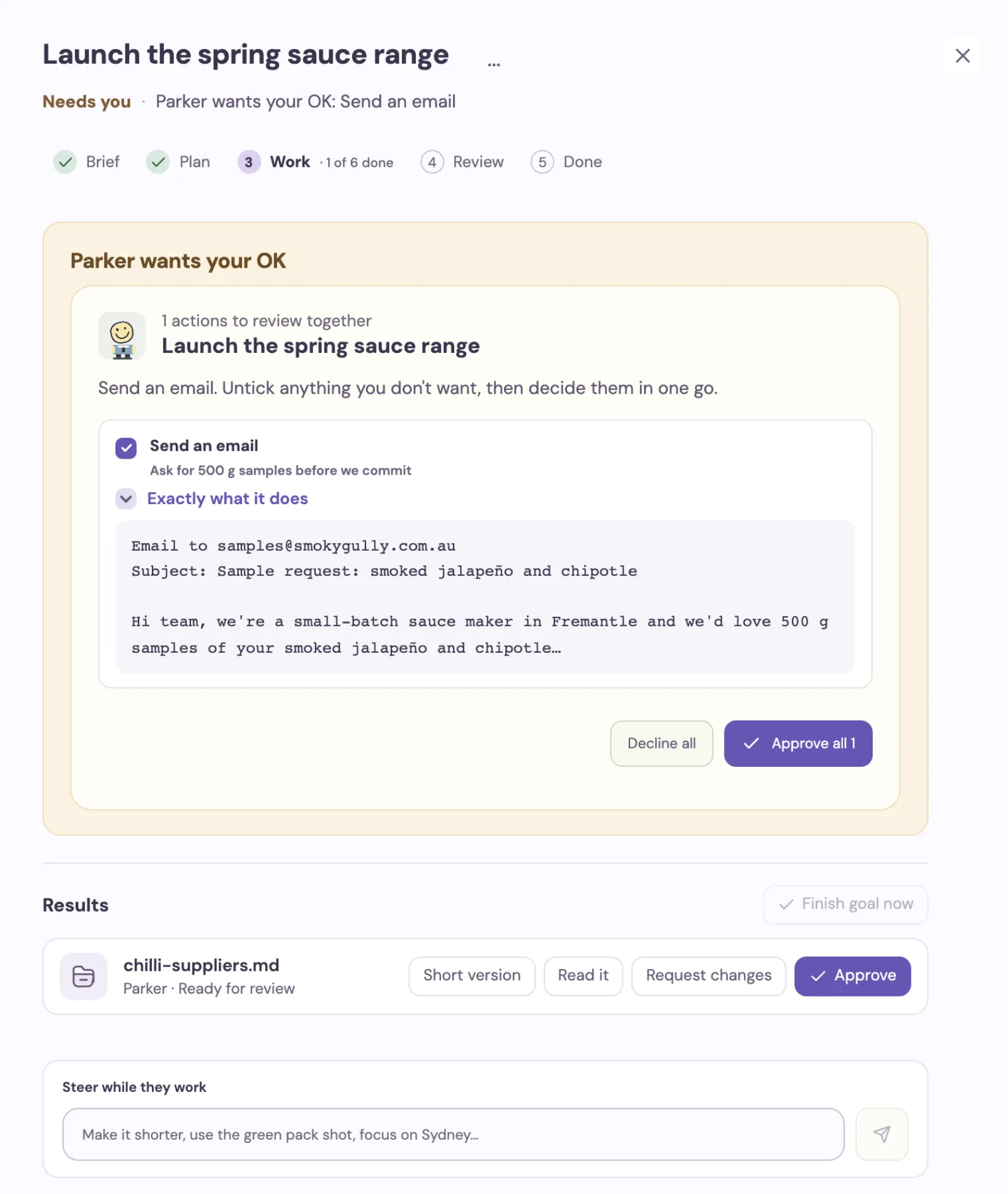
OpenClaw is a general personal assistant you can shape into almost anything. Nev is narrower on purpose: an office for running a small business. In the example office for Fireweed Hot Sauce, Penny the manager plans a goal like “find Perth stockists”, Parker researches, Carlos writes the intro email, and the work is checked before Penny's report reaches you.
Read about your AI team and connectors.
No terminal and no config files. Here's what getting started looks like.
Install Nev on an Apple silicon Mac and start the 14-day trial, or stay on Free Nev.
Nev uses your ChatGPT plan through OpenAI Codex, or runs Claude Code on your Mac with your own sign-in.
Ask for what you need in plain words. Penny plans it and hands each step to the right Nev.
The intro emails are prepared and held in Penny's report until you say yes.
If you want an AI that works on your own computer with your own AI plan, yes. Nev is a Mac app for small business work with a manager, a check and approvals by default. OpenClaw is free, open source and more flexible, and you set it up the way you like.
It can be, especially if someone on the team is comfortable configuring it. OpenClaw has sensible defaults, sandboxed and read-only options, allowlists and a security audit command, and its docs explain how to harden a setup. The work is in choosing those settings and keeping them up. If you'd rather that choice was made for you, Nev holds outside actions for your yes by default.
No. Nev is a paid Mac app with a free plan. If open source matters to you, OpenClaw is MIT licensed and run by a non-profit foundation.
With Nev, yes: it uses your ChatGPT plan through OpenAI Codex, or runs Claude Code on your Mac with your own sign-in, and usage counts towards that plan's limits. Read more about ChatGPT and Claude in Nev. OpenClaw supports subscription-backed models too; check each provider's current terms for third-party tools.
Not today. Your Nevs run on your ChatGPT or Claude plan. If you want to run models on your own hardware now, OpenClaw supports local models.
Not yet. Nev runs on Apple silicon Macs today, and Windows is coming soon. OpenClaw runs on macOS, Windows (in beta) and Linux.
See every tool side by side on the comparison hub.
Competitor details come from the project's own pages, checked 13 October 2026. Prices are US dollars and can change, so check them before you buy.
OpenClaw, ChatGPT and Claude are trademarks of their owners. Nev isn't affiliated with OpenClaw, OpenAI or Anthropic. Nev's own prices are on the pricing page.
Free for 14 days, on the AI plan you already pay for. Nothing sends, spends or publishes until you say so.