Sends: waits for you
Emails and messages, like a reply to a customer or an intro to a stockist.
Approvals
Your Nevs read, research and write freely. Anything that sends, spends, publishes or deletes waits for you, shown exactly as it will go out. Approve it, ask for a change, or say no.
The line is simple: if it leaves your business or can't be undone, a person decides.
Emails and messages, like a reply to a customer or an intro to a stockist.
Anything that buys, pays or commits money. Nev never pays a bill by itself.
Social posts, website updates and changes to your store, like a new Shopify price.
Removing files or records, and running any command on your Mac that a Nev proposes.
Browsing supplier sites, comparing prices and reading the files and folders you linked. Many connected apps ask before every call, reads included.
Writing the report, designing the label, building the page for you to preview. It stays in your project until you accept.
Most goals run without interrupting you. The outside actions are collected for one decision at the end.
Parker finds eight Perth delis. Ivy drafts an intro email to the best three. Penny checks both.
The emails, posts and changes sit under “Ready to send” in the report, with exactly what goes out.
Untick anything you're not sure about, or ask for a change to that one item. The rest of the report stays as it is.
The ticked items are sent and the files go into your Library. Nothing went anywhere before that.
By default your manager makes the small calls mid-goal and writes down what it assumed. If you'd rather sign off the plan before work starts and answer the team's questions yourself, switch on “Check in with me”, for a whole project or just one goal.
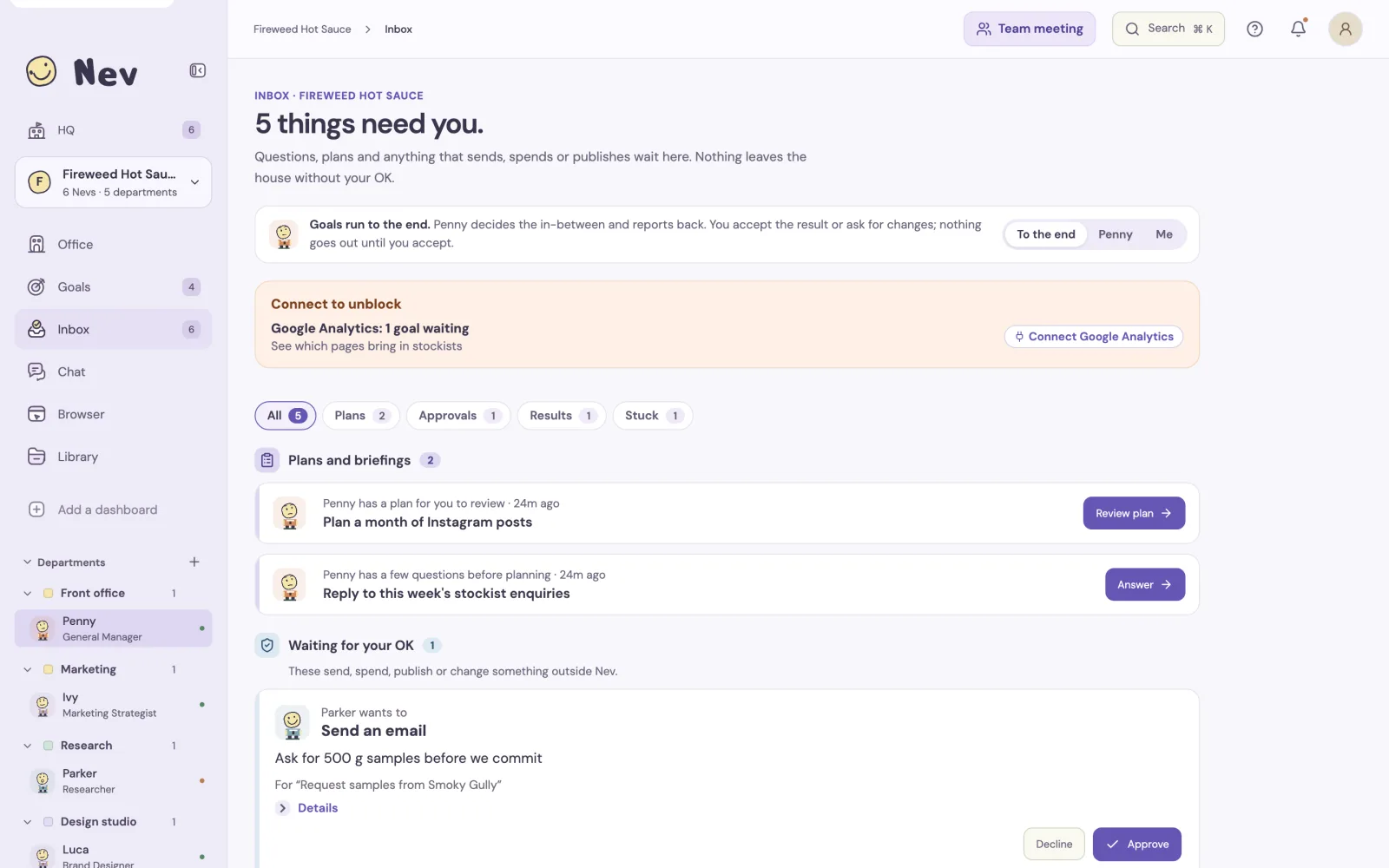
No vague “allow access?” boxes. You approve one specific action, word for word.
Who it goes to, the subject, every line of the body and which conversation it replies to. See customer email.
For a store or a connected app, the precise change it will make, before it makes it. See connectors.
A yes covers that action as shown. If the Nev wants to change it, it has to ask again.
If your Mac stops mid-send, Nev never quietly tries again. It asks you to check what happened first.
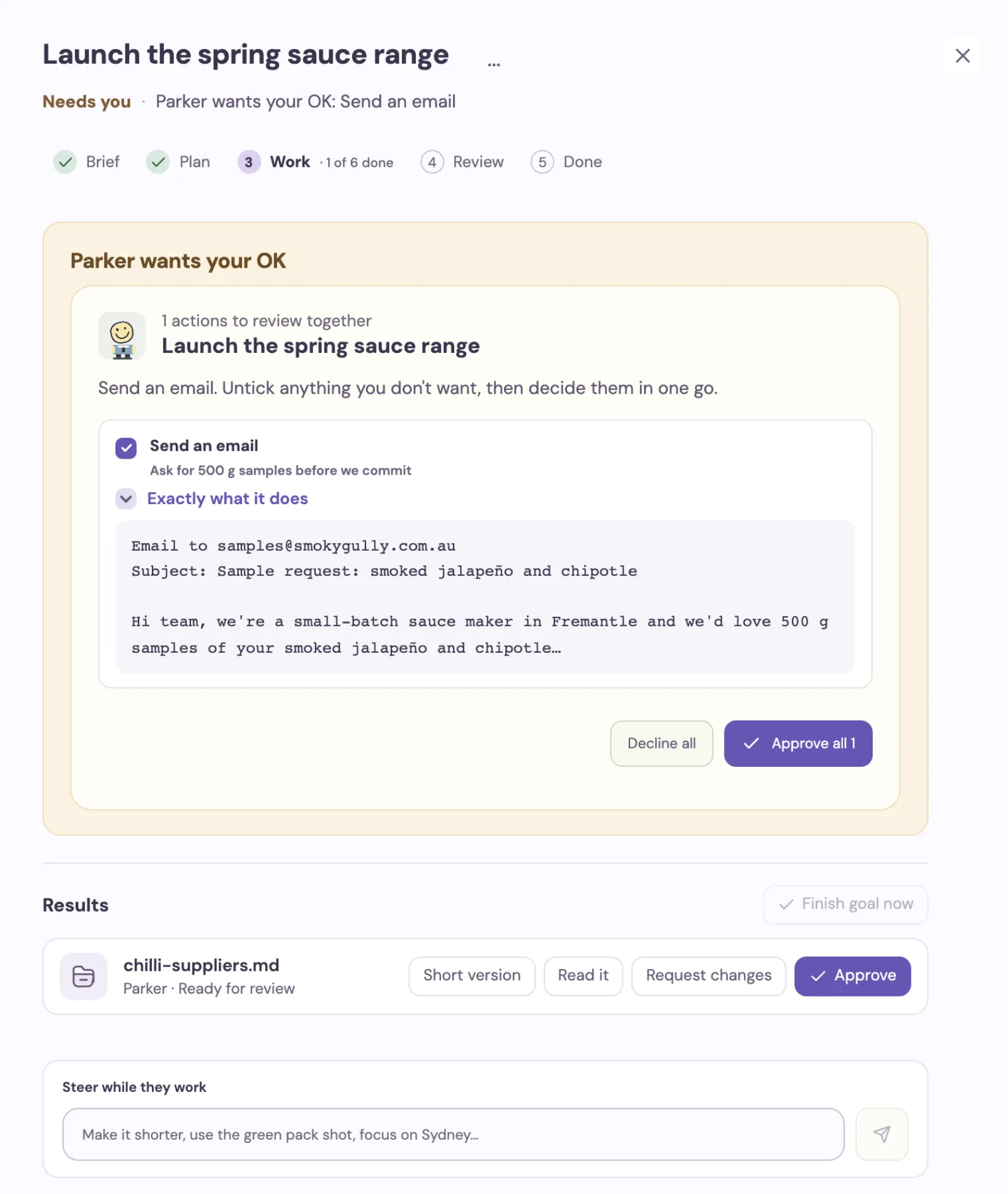
Out at the markets when the stockist emails are ready? The iPhone app, coming soon to the App Store, lets you read the report and approve emails and posts from wherever you are. A notification tells you when someone needs you.
Anything the phone can't show in full waits for you on your Mac. Money admin follows the same rule: Nev prepares invoice reminders and summaries, and never pays or files anything by itself. See finance admin and the phone apps.

It means a person approves the steps that matter before the AI takes them. In Nev, AI agents do the reading, research and drafting, and you decide on anything that sends, spends, publishes or deletes. There's a longer guide in human in the loop AI.
They're as safe as the limits you put on them. Give an agent only the access the job needs, and make it ask before anything leaves the business. Nev does both: connections are opt-in, and outside actions always wait for your approval.
Not in Nev. Every email is held and shown to you with its exact recipients, subject and body. It sends only after you approve it, on your Mac or from your phone.
The exact action, as it will happen: the full email, the post, or the change to a connected app. Your yes covers only that. If it changes, the Nev asks again.
It waits. Nothing goes out, and the request stays in your inbox until you approve it, change it or say no.
Yes, if you choose to. For a connector tool you trust, you can pick Always allow, and you can allow commands for one goal. Built-in sending, posting and spending always ask. Everything waits for your yes by default, and you can take an Always allow back at any time in Settings, then Connectors.
Free for 14 days, on the AI plan you already pay for. Nothing sends, spends or publishes until you say so.