Nev vs ChatGPT Work
A ChatGPT Work alternative that runs on the same ChatGPT plan
ChatGPT Work is OpenAI's agent for longer, multi-step tasks. Nev uses your ChatGPT plan through OpenAI Codex and turns it into a standing team on your Mac, with a manager, checked work, routines and outside actions held for your yes by default. Compared as of October 2026, including where Work is the better pick.
The short answer
You don't have to choose. Nev runs on the ChatGPT plan you already have, so Work can keep the one-off jobs and Nev can run the ongoing ones. Here's who each one suits.
Pick Nev if…
- You want a standing, named team: a manager who plans, specialists who do the work, a check, and one report you can change.
- You'd rather approve outside actions yourself than hand them to an automatic reviewer: in Nev, sends, spends, publishes and deletes wait for your yes by default.
- You want scheduled work that checks a number without AI first, so quiet days use none of your plan.
- You'd like your projects, files, history and memory kept on your Mac.
- You have Claude too: plug in both plans and your manager picks whichever is healthy.
Pick ChatGPT Work if…
- You're on Windows or an Intel Mac, or want it on the web, iPhone or Android today.
- You want work to carry on in the cloud with your laptop shut.
- You don't want another app or another bill: Work comes with ChatGPT.
- Your organisation needs SSO, SCIM, data residency or other ChatGPT Business and Enterprise controls.
- You want its plugins library, or to make plugins in conversation.
Nev and ChatGPT Work, side by side
What each one does, as of October 2026. Prices are US dollars a month.
| What you get | Nev | ChatGPT Work |
|---|---|---|
| Price (USD a month) | Free Nev $0. Kev $9, Nev $19, Giganev $49. Plus the AI plan you already pay for. | Included with every ChatGPT plan, Free included. Go $8, Plus $20, Pro from $100. |
| What you pay for AI | Your ChatGPT or Claude plan's allowance. Never switches you to API billing. | Your plan's usage limits, shared with Codex (five-hour periods on Plus). Plus and Pro can buy credits after the limits. |
| AI models | Yes ChatGPT, Claude or both | Partly OpenAI's models only |
| Where the work runs | On your Mac. Projects, files, history and memory stay there. | In the cloud, or locally in the desktop app with your files, apps and browser. Cloud runs can't reach that computer's files. |
| Platforms | Partly Mac with Apple silicon. Windows, iPhone and Android coming soon. | Yes Web, Mac (Apple silicon or Intel), Windows, iOS, Android |
| A manager, specialists and a check before you see it | Yes A standing, named team. Nevs review each other's work. | One agent per task in OpenAI's Work docs. Sub-agents and a separate checker: Not stated. |
| Asks before outside actions | Yes By default, sends, spends, publishes and deletes wait for you, shown exactly. You can always allow a connector tool you trust. | Yes You can approve important actions. Desktop and Codex modes: Ask for approval, Approve for me (automatic review), Full access, Custom. |
| Scheduled, recurring work | Yes Routines (Kev 2, Nev 5, Giganev unlimited) with a no-AI check first. Your Mac needs to be awake. | Yes Scheduled tasks that repeat, monitor or refresh something. Cloud runs don't need your computer awake. |
| A browser you can watch and take over | Yes Each Nev that needs the web gets one. | Local Work can use your browser. Watching and taking over: Not stated. |
| Integrations | About 30 official connectors, plus your own API, MCP or local tool | Plugins library (Slack, Google Drive, SharePoint, email, calendars, CRM and more), plus plugins made in conversation |
| Team plan | Team Nev, $9 a person, from 3 people. Shared projects and channels. | ChatGPT Business, $25 a user ($20 billed yearly), from 2 users |
| Enterprise controls | Partly Owner, admin and member roles on Team Nev | Yes SAML SSO and MFA on Business; SCIM, EKM, RBAC and data residency on Enterprise |
As of October 2026, from each company's own pages; see Sources below.
What it costs each month
An example for one person on ChatGPT Plus, in US dollars, as of October 2026. Work comes with the plan; Nev is a flat price on top of it. Tax may be added at checkout.
- Nev adds no AI bill of its own and never switches you to pay-as-you-go API billing; the work uses your ChatGPT plan's allowance.
- Nev uses your ChatGPT plan through OpenAI Codex, so its work shares your plan's allowance with Work, Codex and your chats.
- OpenAI lets Plus and Pro buy credits that apply after your plan's limits. That's a setting in your account with OpenAI.
- Nev's yearly plans get two months free. See every plan on the pricing page.
One person on ChatGPT Plus, USD a month
- ChatGPT Plus on its own, with Work $20
- Plus Free Nev: 1 project, 3 Nevs $20
- Plus Kev: 2 routines, live browser $29
- Plus Nev: unlimited projects, 5 routines $39
Prices as of October 2026. Free Nev has no routines; Kev and Nev add them, with a no-AI check first.
Where the difference shows: who says yes
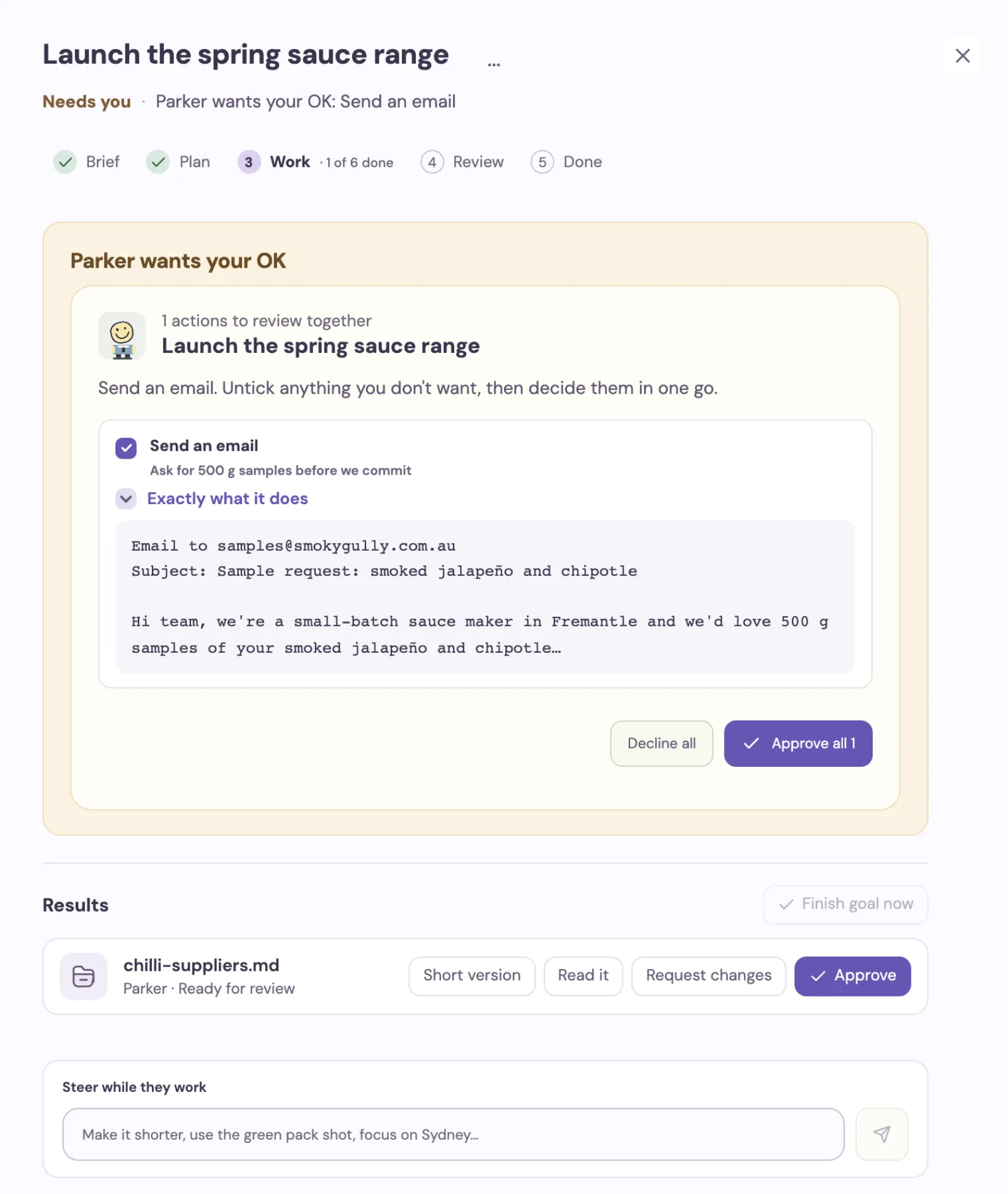
Work lets you approve important actions. In the ChatGPT desktop app and Codex, you pick a permission mode: Ask for approval, Approve for me (an automatic reviewer only asks about actions it detects as potentially unsafe), Full access, or Custom. Nev keeps you as the reviewer by default.
- Anything that sends, spends, publishes or deletes waits for your yes by default.
- You see exactly what will happen before you decide: the address, subject and full message.
- Held actions are gathered in the report and your inbox, so you can approve from one place.
- You can choose to always allow a specific connector tool you trust; built-in sending, posting and spending always ask. How approvals work
Where the difference shows: a routine that only works when there's work
ChatGPT's scheduled tasks can repeat, monitor or refresh something, and in the cloud they run with your computer asleep. A Nev routine runs on your Mac and does its first check without AI, so a quiet day uses none of your plan. An example from the sample office, Fireweed Hot Sauce in Fremantle.
-
Set the job and the timetable once
Tell Penny, your manager, what should happen and how often. Daily, weekly or monthly, at the time you choose.
-
A check without AI decides whether to start
Nev reads the number from your dashboard first. If nothing moved, the routine stays quiet and uses none of your ChatGPT plan.
-
The team digs in and Penny checks it
Parker looks into the dip, Carlos drafts a customer note, and the work is checked before it reaches you. Meet the team.
-
The note waits for your tap
Anything that would go out is prepared and held. Approve it on your Mac, or decline it.
Where the difference shows: one office, either plan
Work runs on OpenAI's models. Nev sits on top of whichever plan you bring, so the same office, Library and history carry on if you add Claude later, or if one plan runs out for now.
- Connect your ChatGPT plan through OpenAI Codex, your Claude plan through Claude Code, or both.
- Your manager picks whichever connection is healthy for each job.
- Projects, files, history and memory stay on your Mac. What a Nev sends to ChatGPT or Claude to do the work follows their terms.
- Keep using Work for one-off jobs; nothing about your ChatGPT plan changes.
Questions about ChatGPT Work alternatives
Is Nev a ChatGPT Work alternative?
It can be, but it also works alongside Work. Work is an agent you hand a task to. Nev turns the same ChatGPT plan into a standing team on your Mac, with a manager, specialists, checked work, routines and approvals held by default.
Can I use my ChatGPT Plus plan with Nev?
Yes. Nev uses your ChatGPT plan through OpenAI Codex, signed in with your own account. Usage shares your plan's allowance, and Nev never switches you to API billing. See how Nev works with ChatGPT.
Does using Nev eat into my ChatGPT Work limits?
Yes, they share one allowance. As of October 2026, OpenAI says ChatGPT Work and Codex share usage, and Nev uses your plan through Codex. Routines help by staying quiet, using no AI, when there's nothing to do.
Does Nev work on Windows?
Not yet. Nev is a Mac app for Apple silicon, and Windows is coming soon. As of October 2026, ChatGPT's desktop app with Work runs on Windows and on Intel and Apple silicon Macs, so it's the better pick if you need those today.
What does Approve for me mean in ChatGPT?
It's one of the permission modes in ChatGPT's desktop app and Codex. Eligible requests go to an automatic review, which only asks you about actions it detects as potentially unsafe. OpenAI doesn't state whether Work uses the same modes. In Nev, outside actions wait for you by default.
Can Nev run while my laptop is closed?
No. Your office lives on your Mac, so it works while your Mac is awake and Nev is running. ChatGPT Work can run in the cloud, which is the better fit if you need that.
Keep comparing
See every tool side by side on the comparison page, or weigh up Claude Cowork, Manus, Lindy and OpenClaw.
Sources
Every ChatGPT Work fact on this page comes from OpenAI's own pages, checked 13 October 2026. Prices are US dollars and can change, so check them before you buy.
- Get started with Work, checked 13 October 2026
- ChatGPT pricing, checked 13 October 2026
- Codex permission modes, checked 13 October 2026
- ChatGPT macOS app system requirements, checked 13 October 2026
- Using credits for flexible usage in ChatGPT personal plans, checked 13 October 2026
ChatGPT, Codex and ChatGPT Work belong to OpenAI, and Claude belongs to Anthropic. Names are used only to describe and compare. Nev isn't affiliated with OpenAI, Anthropic, Manus, Lindy or OpenClaw.
Your new team is waiting by the door.
Free for 14 days, on the AI plan you already pay for. Nothing sends, spends or publishes until you say so.